How to organize Patreon and FANBOX reward packs (thousands of images from monthly zips)
Supporting a few artists means a new pack every month. After a year it is a pile of zips and folders named by date. How to unpack everything and line it up by character, while keeping each pack together.
How the pile builds up
Supporting creators on Patreon, pixivFANBOX, Fantia or similar sites usually comes with rewards: a monthly image pack, bonus sets, request sets, sometimes high-resolution versions in a separate zip.
Each one is a nice surprise. Together they become a problem. After a year of supporting five artists you have sixty zips, some already unpacked, some unpacked twice, with names like 2026-08 Weekly Pack.zip and Bonus Set - Part 2.7z. The same character appears in packs from different artists and different months, and you cannot find anything without opening every folder.
Because you paid for these, deleting them is not an option. So the pile keeps growing.
Why folders per artist and per month are not enough
Keeping one folder per creator and per month is the natural first step, and it does keep the packs tidy. It answers "what did this artist post in August". It does not answer "show me every picture of this character", which is usually the question you actually have.
Unpack and sort in one step
Art Sorter was built for exactly this kind of pile:
- Drop the zips in as they are. Zip, 7z and rar are extracted for you, including archives inside archives. In copy mode your original archives are left untouched.
- Same character together. Images are grouped by character across every artist and every month, then ordered by scene and sequence.
- Packs stay together. File names and original folders are used as a clue, so images from one pack, like
Weekly Pack - 01.pngtoWeekly Pack - 40.png, stay together in the same group even when the art style changes a lot between pictures. - Duplicates set aside. The same image from the normal pack and the high-resolution pack is found, and the larger one stays in your line.
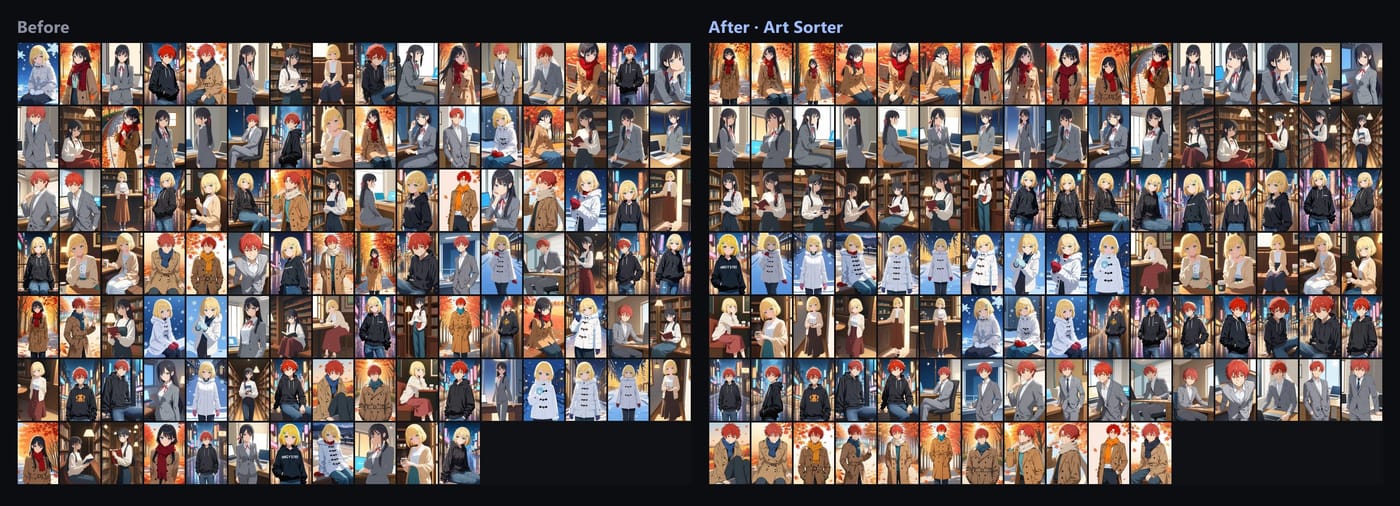
Everything runs on your PC. No account, no upload. Your collection is nobody else's business.
A monthly routine
- Download the new packs as usual.
- Drop them onto Art Sorter and choose add to my collection. Only the new images are analyzed.
- They slot in next to the images they resemble. What you already arranged stays put.
- Name new character groups once, and pin the sets you arranged by hand so later sorting leaves them alone.
It takes a few minutes a month instead of an evening.
A note on rewards
Reward packs are for supporters. Keep them for yourself, follow each creator's terms, and do not share or re-upload them. Art Sorter never sends your images anywhere, which also means it never shares them.
Common questions
Will it mix up two artists who drew the same character? They go into the same character group, which is usually what you want. Within the group, each pack's images stay close together.
Some packs have password-protected archives. Those cannot be opened automatically. Unpack them yourself first, then add the folder.
How much can it handle? Tens of thousands of images in one run, with pause and resume.