Best way to organize thousands of anime images and AI art (2026)
A plain comparison of the usual options for a folder of thousands of anime illustrations, AI-generated images or fan art packs: manual folders, Eagle, Hydrus, digiKam and Art Sorter, and which one fits which job.
The problem
Most collections start the same way. Downloads from pixiv, Patreon or Fanbox packs, images saved from X, a few thousand outputs from Stable Diffusion or ComfyUI. After a year it is one folder with names like 00412-3829104.png, and finding "all the images of that one character" means scrolling.
There are two different jobs here, and most tools only do one of them:
- The first sort: turning an unsorted pile into groups that make sense.
- Keeping it tidy: tagging, searching and browsing a library you already organized.
The usual options
Folders by hand. Free, and the result is plain folders any program can open. It is also the slowest option by far: every image is a decision.
Eagle. A polished paid asset manager, very good for collecting references from the browser and browsing with tags, colors and smart folders. Organizing is still done by you, and files live inside Eagle's library.
Hydrus Network. Free and open source, extremely powerful tag-based library with a duplicate finder and download tools. It has a steep learning curve and also keeps files in its own database.
digiKam. Free and open source, strong for camera photos (albums, metadata, face recognition of real people). It is not built for recognizing anime characters.
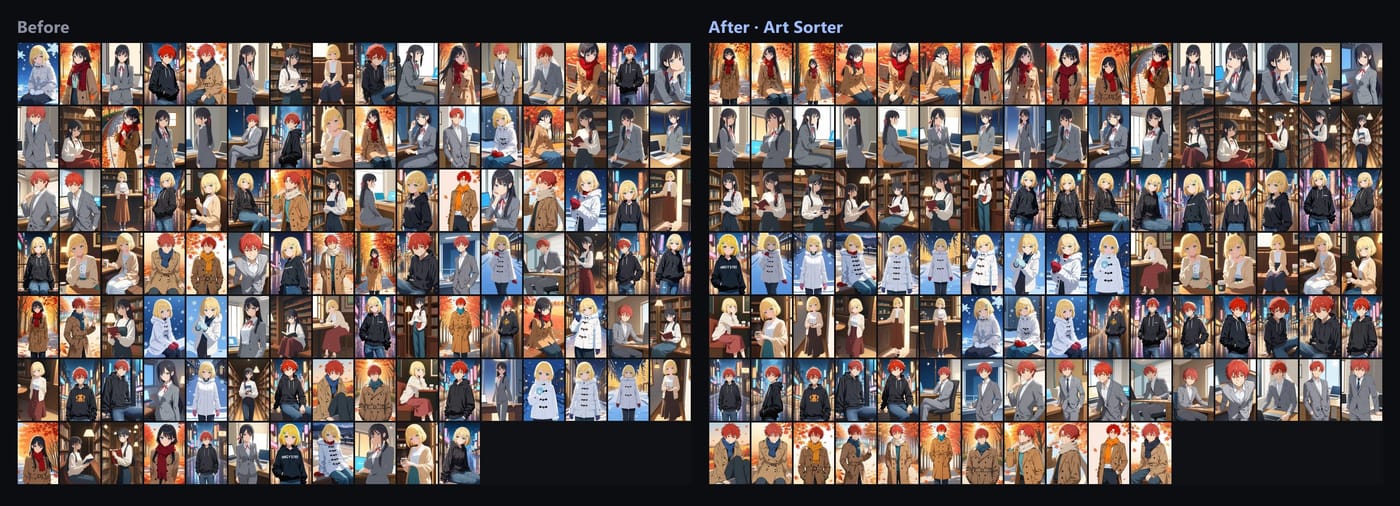
Art Sorter. A Windows program made for the first sort. You drop in the folder and it groups images of the same character, keeps each artist's series together, lines scenes up in order, and moves duplicates (including resized copies) aside. Everything runs on your PC; nothing is uploaded. The result is plain folders.
Which one to pick
- A few hundred images: folders by hand are fine.
- You collect references one at a time and want tags and search: Eagle or Hydrus.
- Camera photos of real people and trips: digiKam.
- A backlog of thousands of unsorted anime or AI images: start with Art Sorter for the first sort, then keep the folders as they are or import them into Eagle or Hydrus if you like tagging.
The tools are not exclusive. The expensive part is the first sort, and that is the part worth automating.
Try it on your own folder
Art Sorter's free trial sorts your whole folder so you can see the result before paying; 300 images are kept in full quality and your originals are never moved. It is a one-time purchase, not a subscription.