Eagle vs Hydrus vs digiKam vs XnView vs Art Sorter: which image organizer for large illustration folders (2026)
A plain comparison of the tools people reach for when an image folder gets out of hand. Who does the organizing, where your files end up, what it costs, and which one fits your situation.
Who this is for
You have a folder, or a pile of folders, with thousands of illustrations, AI outputs, screenshots or saved fan art, and you want them in order. The tools below all get recommended for this, but they solve different parts of the problem. The main question is simple: who does the sorting, you or the program?
This page compares Eagle, Hydrus Network, digiKam, XnView MP, Adobe Bridge and Art Sorter on that question. Each tool is described by what it actually does well. Where Art Sorter is not the right pick, it says so.
Quick comparison
| Eagle | Hydrus Network | digiKam | XnView MP | Adobe Bridge | Art Sorter | |
|---|---|---|---|---|---|---|
| Main job | Collect and browse a reference library | Tag-based archive of a large collection | Photo management (camera photos, RAW) | Fast viewer and batch tool | File browser for Adobe workflows | Sort a messy folder automatically |
| Who organizes | You (tags, folders, smart folders) | You (tags, with shared tag repositories) | You, plus face detection for people | You (folders, batch rename) | You (keywords, ratings) | The program: groups by character and scene from the pictures |
| Where files live | Inside the Eagle library | Inside the Hydrus database | Your folders (it indexes them) | Your folders | Your folders | Your folders (plain files, no database) |
| Duplicates | Basic | Strong, with a review queue | Yes, similarity search | Yes, by content | No | Visual copies, including resized ones, set aside for review |
| Learning curve | Low | High | Medium | Low | Low | Low |
| Platforms | Windows, macOS | Windows, macOS, Linux | Windows, macOS, Linux | Windows, macOS, Linux | Windows, macOS | Windows 10 / 11 |
| Price | Paid license | Free, open source | Free, open source | Free for personal use | Free with an Adobe account | One-time purchase; free preview of the whole folder, 300 images kept in full quality |
| Runs offline | Yes | Yes | Yes | Yes | Yes | Yes, nothing is uploaded |
Eagle
Eagle is the polished choice for building a reference library one image at a time. The browser extension saves images with their source, smart folders keep things tidy, and browsing a large library is fast with filters such as color and shape.
The trade-off: the first sort is manual. If you already have 5,000 unsorted files, Eagle gives you a good place to put them, not a way to put them there. Files also live inside the Eagle library, which is what makes it fast but means your collection depends on the app.
Best for: designers and illustrators who collect references deliberately and like tagging. See the detailed Eagle comparison.
Hydrus Network
Hydrus is a free, open-source archive built around tags. It handles very large collections, has serious duplicate tools, and can pull in tags from shared repositories so you do not type everything yourself.
The trade-off: it imports files into its own database, the interface takes real time to learn, and it is built for people who want to manage tags. If that is not you, it feels like a lot of machinery.
Best for: people who want a booru-style personal archive and are willing to invest in learning it. See the detailed Hydrus comparison.
digiKam
digiKam is a mature, free photo manager. It is strong on camera photos: RAW support, geotagging, face detection for people, and albums that map onto your real folders.
The trade-off: its recognition is built for faces in photographs. It does not group illustrations by the character drawn, and it does not pick out scenes or sequences in artwork. For drawn images it becomes a good viewer with tags you apply yourself.
Best for: photographers and anyone whose collection is mostly camera photos.
XnView MP
XnView MP is a fast viewer and batch tool: browse, convert, batch rename, compare, find duplicates by content. It works on your folders as they are and is free for personal use.
The trade-off: it does not organize anything on its own. It is the tool you use once you have decided what goes where.
Best for: quick browsing and batch operations, often alongside another tool.
Adobe Bridge
Bridge is the file browser that ships with Adobe apps. It is free with an Adobe account, reads your folders directly, and is good at keywords, ratings and previews for Photoshop and Illustrator work.
The trade-off: like XnView, it does not sort for you, and it is heavy for a collection that has nothing to do with Adobe.
Best for: people already living in Photoshop or Illustrator.
Art Sorter
Art Sorter does one job: the first sort of a large, messy folder. You drop the folder on the window and it looks at the pictures, not the file names. Images of the same character are grouped, then split by scene, then put in sequence. Visual copies, including resized ones, are set aside for review. New images can be slotted in next to similar ones later without re-sorting everything.
The result is ordinary folders and files on your disk. There is no library and no database, and nothing leaves your PC.
The trade-off: it is Windows only, and it is not a browsing app with tags and smart folders. If you want that, use it as the first step and hand the sorted result to Eagle or Hydrus.
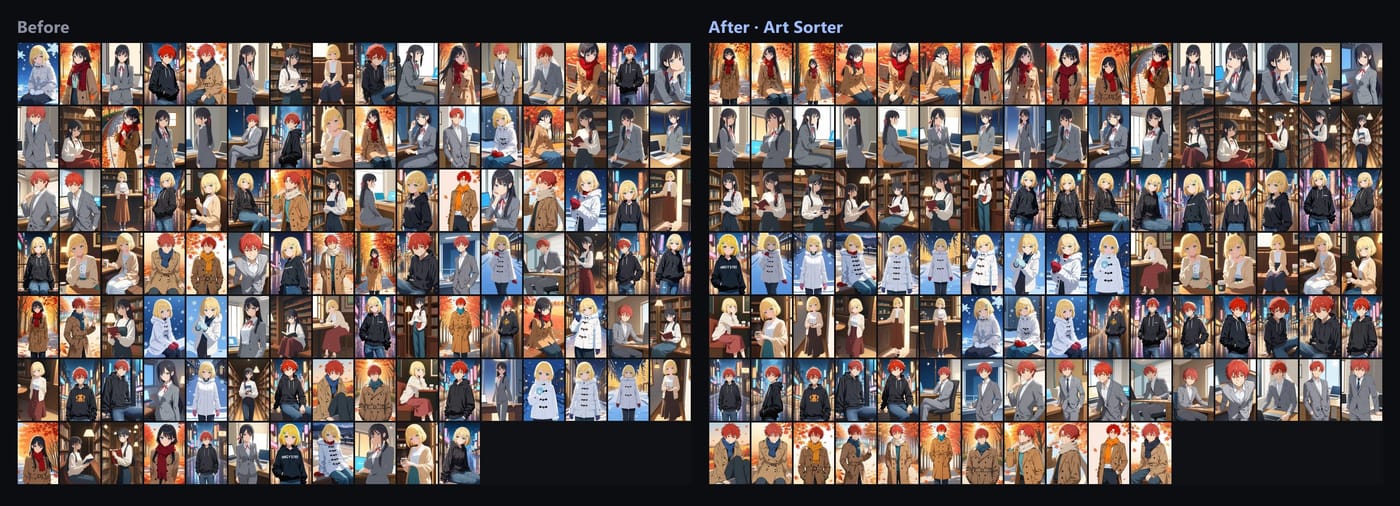
Best for: anyone starting from thousands of unsorted illustrations, AI outputs or images saved one by one from X, Patreon, Fanbox or pixiv.
Pick by situation
- You collect references one at a time and enjoy tagging. Eagle.
- You want a huge tagged archive and do not mind learning a complex tool. Hydrus Network.
- Your collection is mostly camera photos. digiKam.
- You just need to view, convert and batch rename. XnView MP.
- You work inside Photoshop or Illustrator all day. Adobe Bridge.
- You have thousands of unsorted illustrations or AI images and want them grouped without tagging by hand. Art Sorter.
Using them together
The tools above are not exclusive. A common setup:
- Run the messy folder through Art Sorter so it is grouped by character and scene.
- Name the groups.
- Keep browsing in XnView, or export the names and tags into Eagle or Hydrus.
That gives you a tagged library without the hours of manual first sorting.
Frequently asked questions
Which image organizer sorts automatically?
Of the tools here, only Art Sorter groups images by looking at the pictures themselves. Eagle, Hydrus, digiKam, XnView and Bridge rely on tags, folders or metadata that you or a rule set apply. digiKam can detect faces in photographs, which helps for people in photos but not for drawn characters.
Which one keeps my files as normal folders?
digiKam, XnView MP, Adobe Bridge and Art Sorter work on your folders directly. Eagle and Hydrus move files into their own library or database.
Which one is free?
Hydrus Network and digiKam are free and open source. XnView MP is free for personal use. Adobe Bridge is free with an Adobe account. Eagle is a paid license. Art Sorter is a one-time purchase with a free preview that sorts your whole folder and keeps 300 images in full quality.
Does any of them need an internet connection?
No. All six run on your PC. Art Sorter also never uploads images; sorting happens on your own machine.