How to organize game CG and visual novel CG sets (variants, extracted files, mixed folders)
Extracted game CGs and visual novel CG galleries come with dozens of near-identical variants per scene and file names like ev012_03b.png. How to group them by character and keep each scene's variants together in order.
Why CG folders are hard to browse
Visual novels and story-driven games ship their event art as CG sets. Whether you extracted them from the game files, saved a completed gallery, or bought an official art set, the folder tends to look the same:
- Many variants per scene. One event image comes in five to thirty versions: different expressions, outfits, lighting or text layers.
- Code names instead of titles.
ev012_03b.png,cg_A07_diff2.png,bg004n.png. The numbering follows the game's script, not anything you remember. - Several games in one place. After a few titles, characters from different games share one big folder.
- Duplicates and leftovers. Base layers, half-transparent overlays and re-saved copies sit between the finished images.
Scrolling through that to find one scene means opening hundreds of nearly identical thumbnails.
What you usually want instead
Most collectors want the same three things: every image of one character together, each scene's variants kept in a row in their natural order, and the junk (copies, empty layers) out of the way. File names cannot give you that, because the code names do not say who is in the picture.
Sort by what is drawn
Art Sorter looks at the images themselves:
- Same character together, across scenes and across games
- Variants stay together. Images that are the same scene with small changes are kept side by side and ordered as a sequence
- Original folders and file-name patterns are used as a clue, so a CG set from one title is not mixed into another title that happens to share an art style
- Copies set aside. Re-saved and resized copies go to a separate folder; nothing is deleted
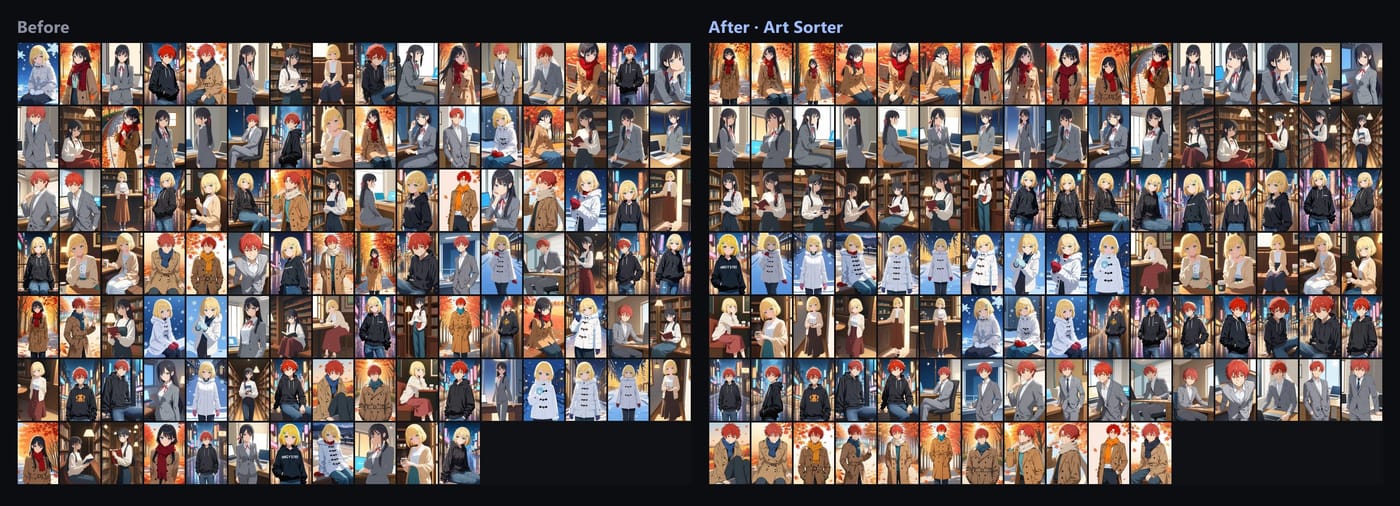
Your images are never uploaded. Recognition runs on your PC, and the order is matched by our server from descriptions of the images (numeric fingerprints and tag words), so sorting needs an internet connection.
A simple setup
- Put each game's CG folder in one parent folder. Keep the original per-game folders; they help keep titles apart.
- Run Art Sorter in copy mode the first time, so your extracted files stay as they are.
- Check the result and drag anything that landed in the wrong group. Pin groups you arranged by hand so later sorting leaves them alone.
- When you add a new title, sort only the new folder. It slots in next to what you already have.
Common questions
Can it read files straight from the game archive? No. Extract or export the images first with the tool you normally use. Zip, rar and 7z archives of images are unpacked automatically.
Will it remove the variants I want to keep? No. Variants are kept and ordered next to each other. Only exact or resized copies go to the duplicates folder, and nothing is deleted.
How large a collection is fine? Tens of thousands of images in one run, with pause and resume.
Can I try it first? Yes. You can try up to 300 images for free, then pay once to keep using it. One-time purchase, no subscription.