What the Hydrus PTR can't tag: sorting your own commissions and AI images
The public tag repository is great for images that circulate widely. It has nothing for your commissions, AI outputs and one-off saves. Here is a practical way to get those tagged without typing.
Where the PTR stops
Hydrus's public tag repository (PTR) is one of the best things about it. Sync it and millions of images that circulate on boorus arrive with character, series and artist tags already attached. You never typed them.
It only works for images the PTR has seen. That leaves a large blind spot for most collections:
- commissions and private drops from Patreon or Fanbox
- AI outputs you generated yourself
- images saved one by one from X, where the file is a re-encoded copy
- crops, edits and resized versions
For these the PTR returns nothing. You are back to tagging by hand, which is the job Hydrus was supposed to remove.
The usual workarounds, and why they stall
- Tag by hand. Works for a hundred images. Stops at a thousand.
- Filename tagging. Only useful when the file names carry meaning.
00123-2847361.pngdoes not. - Wait for the PTR. Your commissions will never be in it, by definition.
A different first step: group first, name once
The tagging problem is mostly a grouping problem. If all 40 images of one character were already next to each other, you would only have to type that character's name once.
That is what Art Sorter does. Drop the folder on it and it looks at the pictures, not the names:
- images of the same character are grouped, then split by scene, then put in sequence
- resized copies and near-duplicates are set aside for review
- appearance tags such as hair color, eye color and person count are detected automatically
Then you name each group. One name per character, not per file.
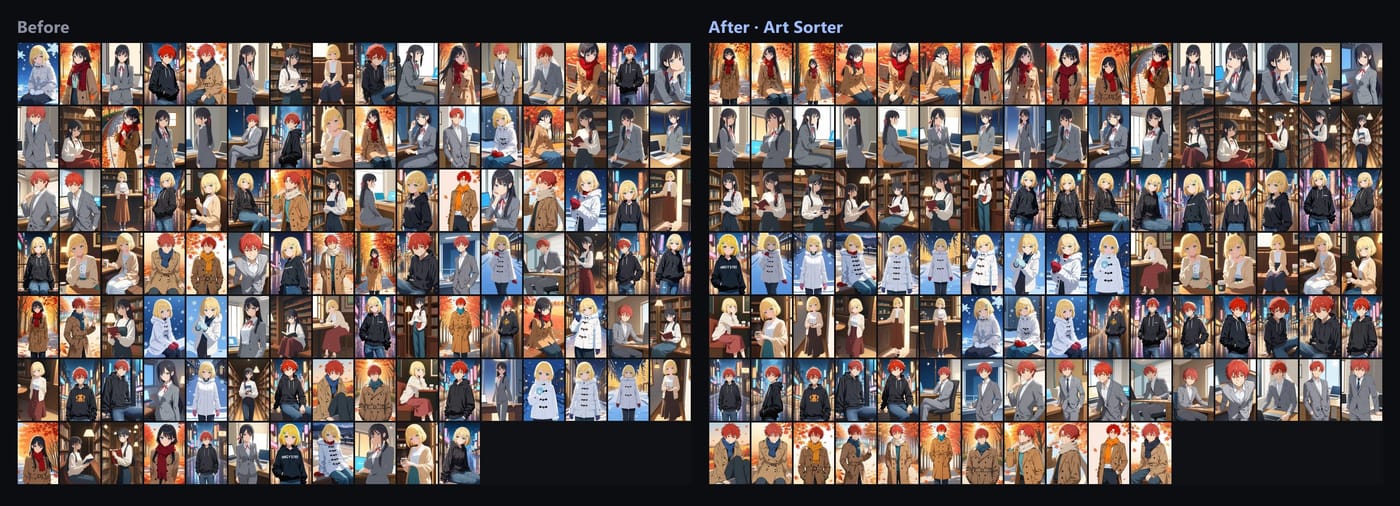
Getting it into Hydrus
Art Sorter writes a .txt sidecar per image in Hydrus's own tag syntax (character:isagi, pink hair, 1boy). Hydrus imports those with its sidecar option; the full click path is in Import Art Sorter tags into Hydrus.
The result is a Hydrus database where your private images have the same kind of tags the PTR gives public ones. Everything ran on your PC. Nothing was uploaded, which matters for commissions you were asked not to share.
What this does not replace
Art Sorter does not know character names. It can tell that 40 images show the same person; you tell it who. It also does not replace Hydrus as the place you browse and search. Think of it as the missing first step, not a second database.