Thousands of images.
One clean line.
Drop in a folder. Art Sorter groups your images by character and scene, lines them up in order and sets duplicates aside. Everything runs on your own PC.
Free trial · installs without the Windows security warning · Download the installer instead
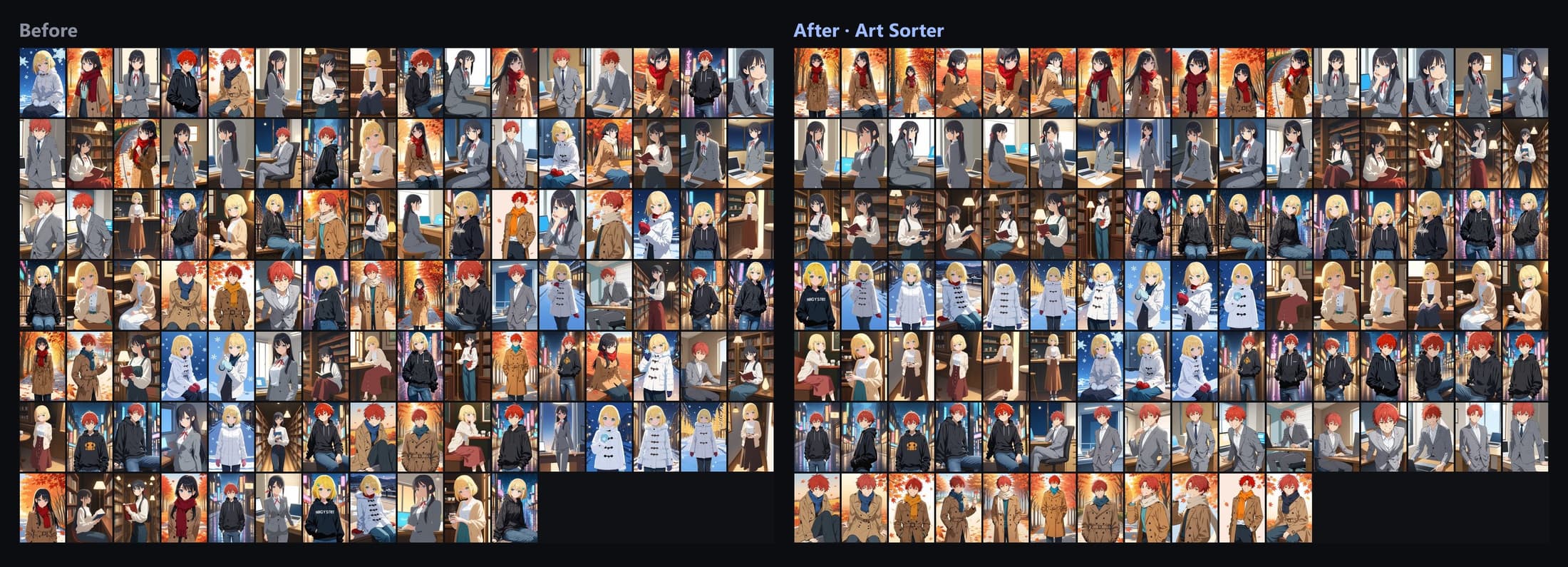
A real result. 113 mixed-up images, lined up by character and scene in about two and a half minutes on a laptop.
It looks at the character and the scene, not the file name. The same character stays together even across different artists.
Recognition runs on your PC. To match the order, Art Sorter sends its matching service numeric fingerprints, tag words with probabilities that describe each image, a perceptual hash, and each file's size, dimensions and time. The service processes them in memory and does not store them. Image files themselves are never uploaded.
Identical copies and resized versions go to their own folder. You compare them side by side and decide.
Same images. Nothing moved by hand.
Left is the folder as it was saved. Right is the line Art Sorter built from it.
Three steps, mostly waiting.
No tagging, no rules to set up. Drop a folder and come back when it is done.
Drag a folder or a zip, 7z or rar file onto the window. Choose to copy or move. Archives inside are extracted for you.
Images are grouped by character and scene and placed in one line. It pauses, resumes, and notifies you when it finishes.
Drag to reorder. Select a group and type a name once. Pin the ones you never want touched. Everything can be undone.
Built for a collection that keeps growing.
New images keep coming in. You cannot sort everything again each time.
Newly added images slot in next to the ones they resemble. The line you already fixed stays as it is.
Rename as many pictures as you like at the same time, and move any number of them into a folder in one step.
Pinned images keep their names and order, and are left out of sorting.
Tens of thousands of images in one run, with pause and resume and sleep protection.
Send names and tags to Hydrus sidecars, XMP for digiKam and XnView MP, Eagle or CSV. Originals are never modified.
Every step can be undone, and moved files return to their original folders in one click.
People who really need Art Sorter
Your collection is nobody else's business.
Art Sorter is a desktop program, not a web service. There is no account, no image upload and no cloud library.
Pay once. Keep it.
No subscription. Try it on your own images first.
- Free preview of your whole folder, 300 images in full quality
- One PC per key
- All updates included
- Cards, PayPal, Google Pay, Alipay
Runs on an ordinary PC.
| OS | Windows 10 / 11 (64-bit) |
| Memory | 8 GB (16 GB recommended for 30,000+ images) |
| Disk | About 1.5 GB. The installer is 160 MB; the AI models for image analysis (840 MB) download once on first run |
| Graphics | Optional. Any DirectX 12 GPU is used automatically |
Questions people ask first.
Does it change or delete my original files?
In copy mode your originals are untouched. In move mode files go into the sorted folder and can be restored to their original places in one click. Nothing is deleted unless you empty the discard folder yourself.
Does it work with AI-generated images?
Yes. Batches from Stable Diffusion, NovelAI, Midjourney or ComfyUI are grouped by character and scene, and near-identical variants are set aside as duplicates.
Is it a photo organizer?
It works best with illustrations, fan art, manga panels and AI-generated images. It groups by the character and scene drawn in the image, not by faces or GPS. Ordinary photos can also be sorted by the conditions you choose.
Does it know character names?
It groups images of the same character, but names come from you. Name one group and Art Sorter suggests the rest.
How many images can it handle?
Tens of thousands in one run, with pause and resume and a notification when it finishes.
Is there a Mac version?
Windows only for now.
What is Art Sorter?
Art Sorter is an image organizer for Windows, built for people who collect illustrations, fan art, anime images and AI-generated images. It works as an AI image sorter: it recognizes the character and the scene in each picture, sorts images by character, and lines up thousands of files that would take days to arrange by hand.
It is also a duplicate image finder. Identical copies and resized versions are collected in one place so you can compare and clean them up. If you are looking for bulk image sorting software that handles Stable Diffusion, NovelAI or Midjourney output, or an illustration organizer that keeps everything on your own PC, this is what Art Sorter is for.
Try it on your own folder.
Try it on your whole folder for free: every image is sorted so you can see the result, and the first 300 are yours in full quality. No account, no card.
Free trial · installs without the Windows security warning · Download the installer instead